Contributors:
Amol Ghemud ABCD
Published: November 7, 2024
Summary
For SEO reporting, GSC should be used as the primary source for search performance metrics (impressions, clicks, CTR), while GA4 should be leveraged for on-site engagement and user interaction insights. Align both data sets with complementary metrics like conversion rates and organic traffic trends to provide a comprehensive view of SEO efforts.
In This Article
Share On:
Marketers often struggle when comparing numbers between GA4 and GSC. At first glance, both platforms appear to report on similar metrics, yet the results typically don’t align. This mismatch creates confusion, especially when stakeholders expect a single version of the truth in SEO reporting.
The core reason lies in the way these tools are built. GA4 measures user behaviour across every channel: organic, paid, social, and direct, while GSC focuses purely on organic search performance. Understanding the intent behind each tool enables you to extract the right insights, present clearer reports, and avoid drawing incorrect conclusions in 2025.
GA4 New Users vs. GSC Clicks
GA4 New Users represent the number of first-time visitors to your site during a selected timeframe. GA4 identifies these users through cookies or user IDs. This means if someone clears cookies or switches devices, they may be counted as new again. GA4’s strength lies in providing a holistic picture of all user interactions, including organic, paid, referral, social, and direct. Its tracking is powered by the analytics tag on your website, which captures detailed behaviour once the visitor lands.
GSC Clicks, on the other hand, captures the number of times someone clicks your website link from Google Search. Unlike GA4, it doesn’t track what users do afterwards, it only measures search performance. The dataset comes directly from Google’s search index and includes only organic traffic.
These numbers will rarely match because GA4 is user-focused across multiple channels, while GSC is search-specific and click-based.
Should GA4 and GSC Match?
The short answer is no. GA4 new users and GSC clicks don’t align because they measure different touchpoints. GSC captures every valid click in the SERP, while GA4 may filter, reclassify, or miss some traffic due to cookie resets, device switches, or sampling. In practice, marketers should avoid comparing them one-to-one and instead align them to answer specific questions.
How Do You Track User Interactions in GA4 and GSC?
Even though both tools serve different purposes, aligning specific metrics can give deeper insights:
Organic traffic segmentation in GA4 helps you isolate users who came to your site via search.
Clicks in GSC vs. click events in GA4 indicate how many search visitors transitioned into actual site interactions.
CTR in GSC vs. bounce rate in GA4 uncovers whether search snippets are attracting the right traffic.
Impressions in GSC vs. new users in GA4 show how well your site is being discovered and how much of that discovery translates into fresh visitors.
This alignment provides a more realistic picture of SEO performance than treating the two reports as interchangeable.
How To Collect and Compare Reporting From GA4 and GSC ?
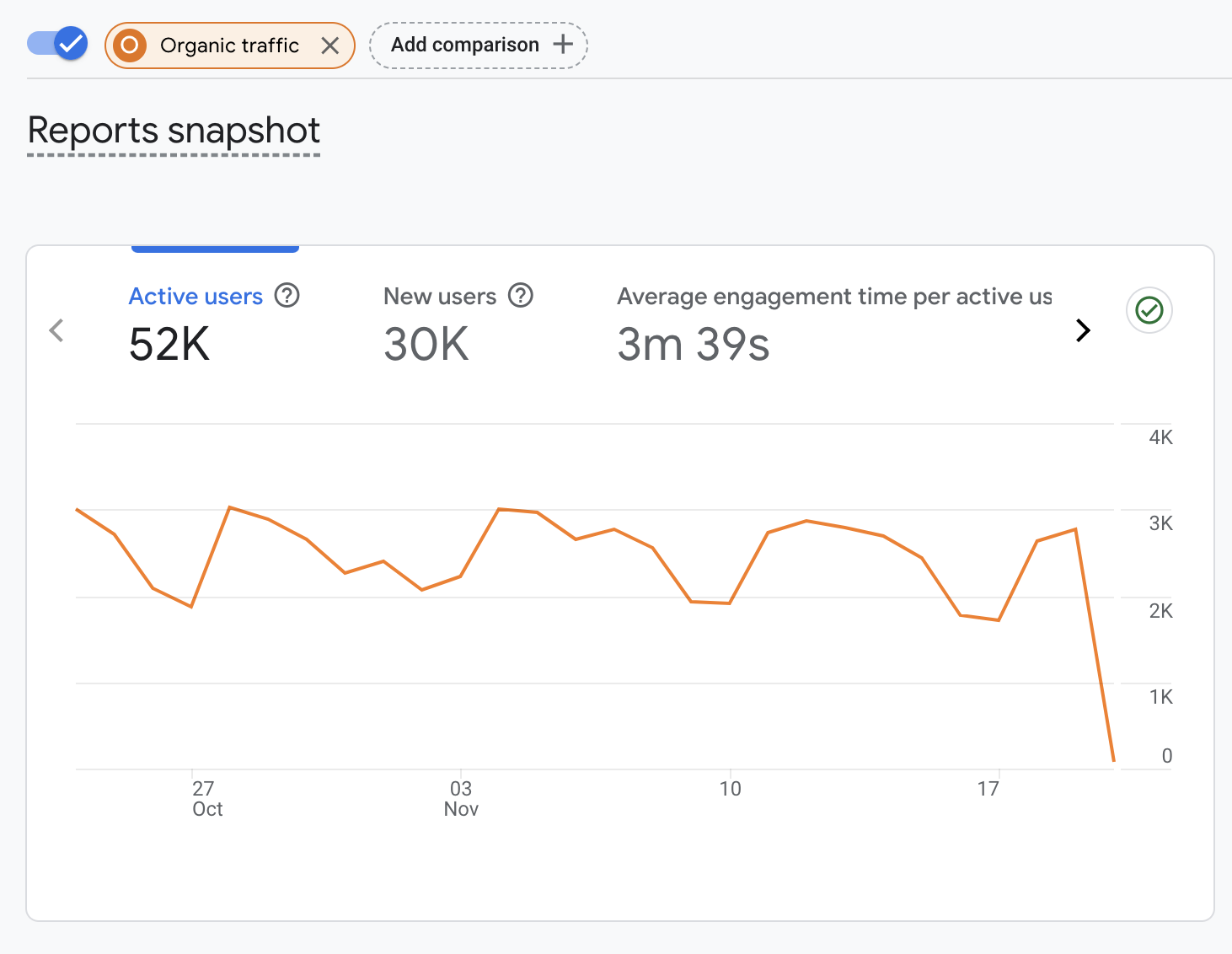
First, filter the traffic source to ‘organic’ in GA4 from the default ‘all channels‘ view. This allows for a direct comparison with GSC, which only includes organic search results, whereas GA4 reports on all channels by default.
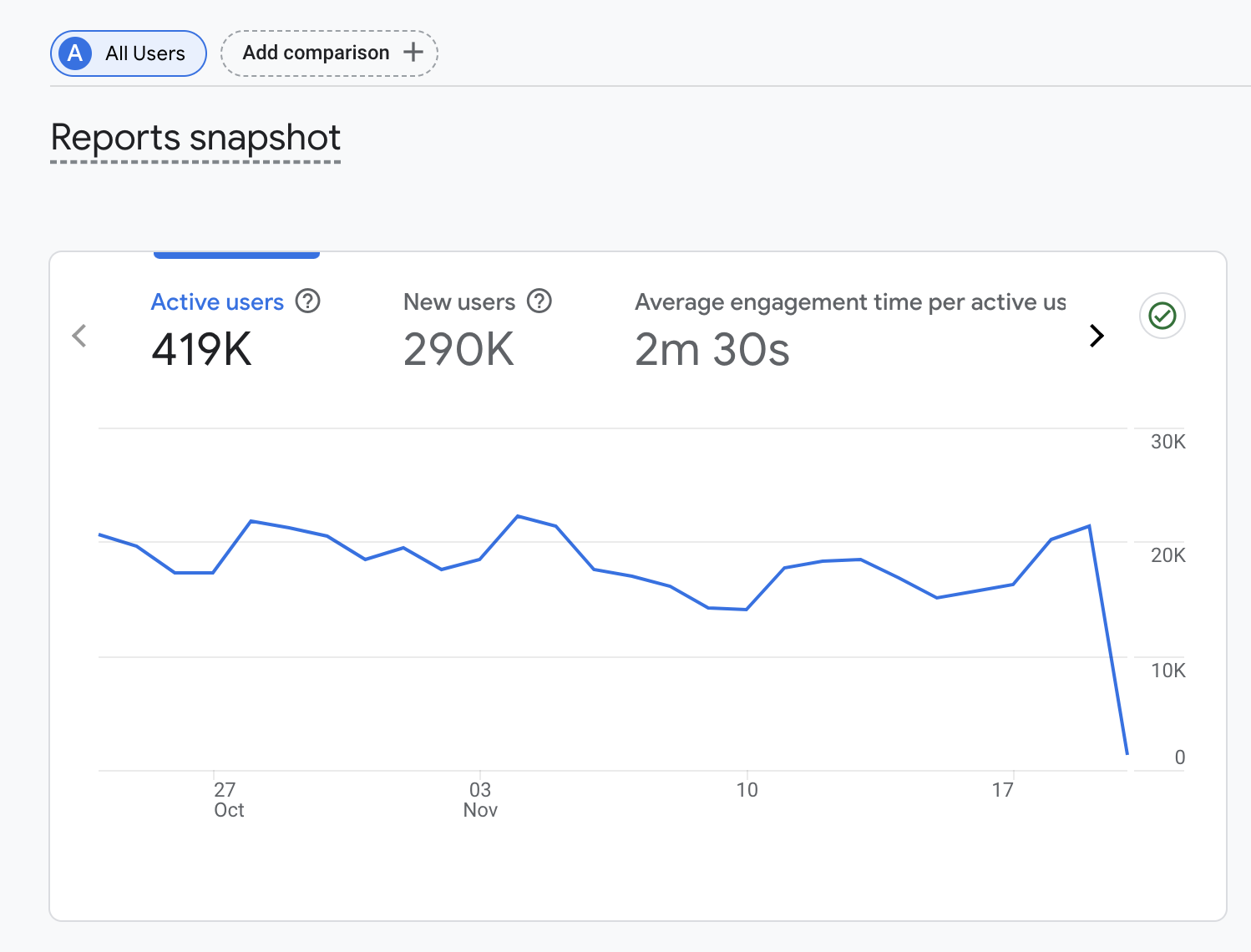
The default report view in GA4 provides a comprehensive overview of all users (organic, direct, referral, paid ) interacting with the website, regardless of their originating channels.
Source: GA4สล็อตjoker123สล็อตเว็บตรง
Filtered report of organic traffic, selectable via the “Add comparison” feature.
Since New Users in GA4 refers to unique first-time visitors, it should not be directly compared to Clicks (the number of times your site’s link is clicked from Google search results) in GSC.
Using sessions from organic traffic in GA4 to compare with clicks in GSC can directly measure the effectiveness of organic search traffic. A session in GA4 represents a group of user interactions with your website within a given timeframe.
Components of sessions include pageviews (each time a page is loaded), e-commerce transactions (purchases made on your site), and events (user interactions like clicks, form submissions, etc.). Therefore, click events from organic sessions in GA4 can be compared with clicks in GSC.
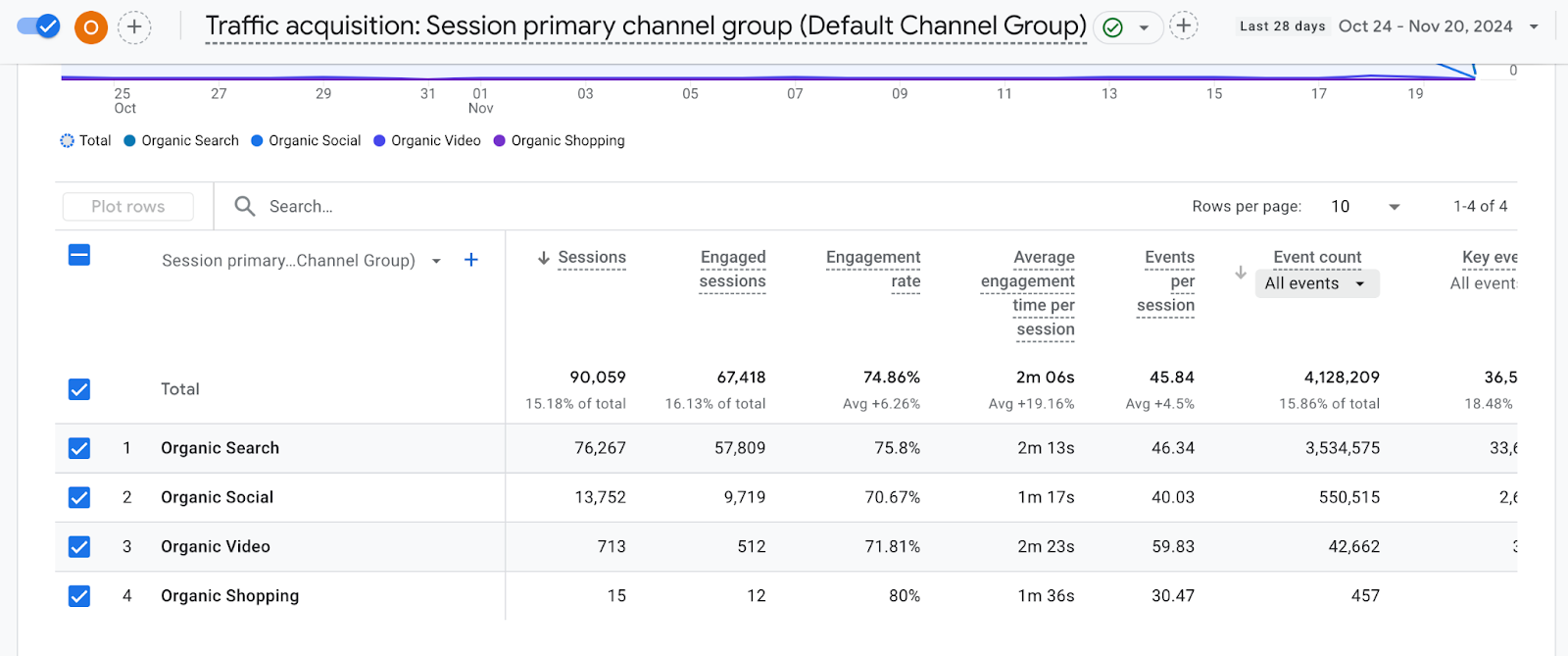
Traffic acquisition (Session) reporting for the organic channel, by default, includes “All events”.
Source: GA4สล็อต pg
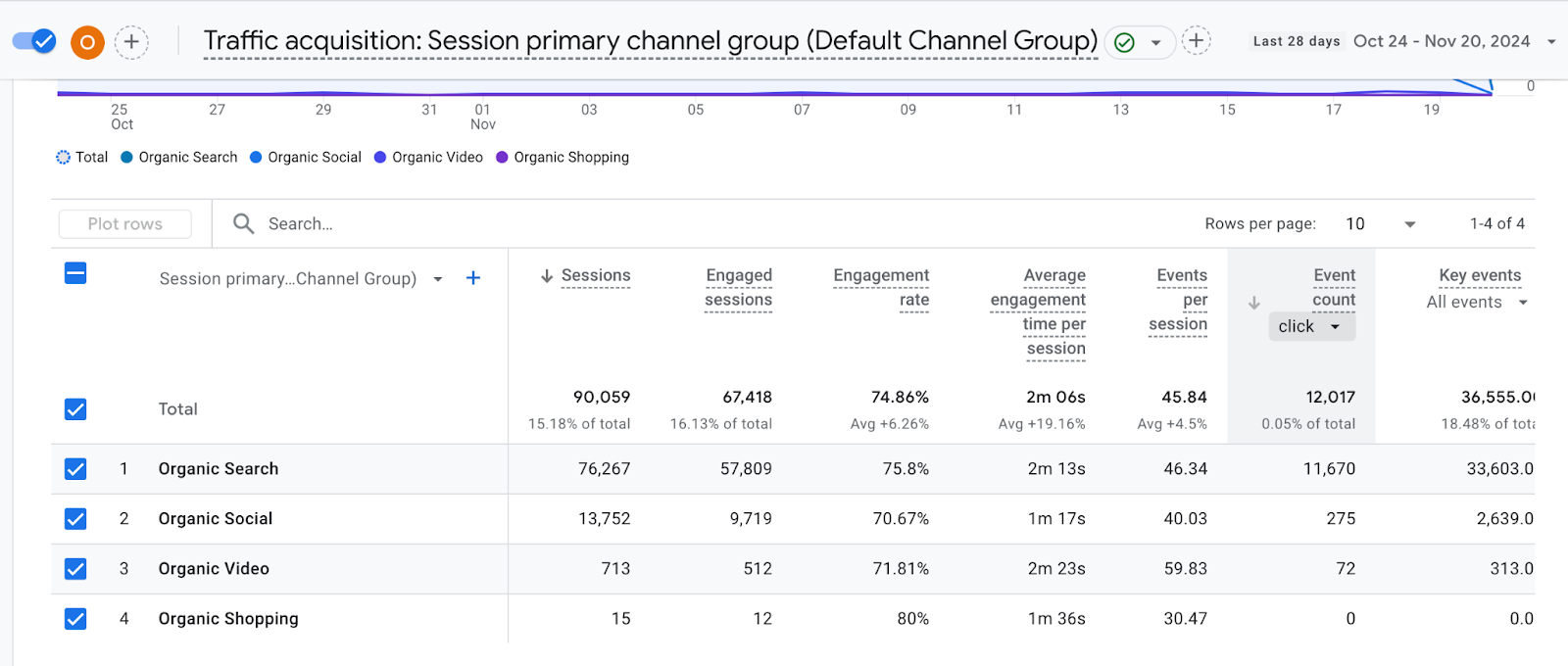
Traffic acquisition (Session) reporting for the organic channel, filtered to “Click events”.
Source: GA4
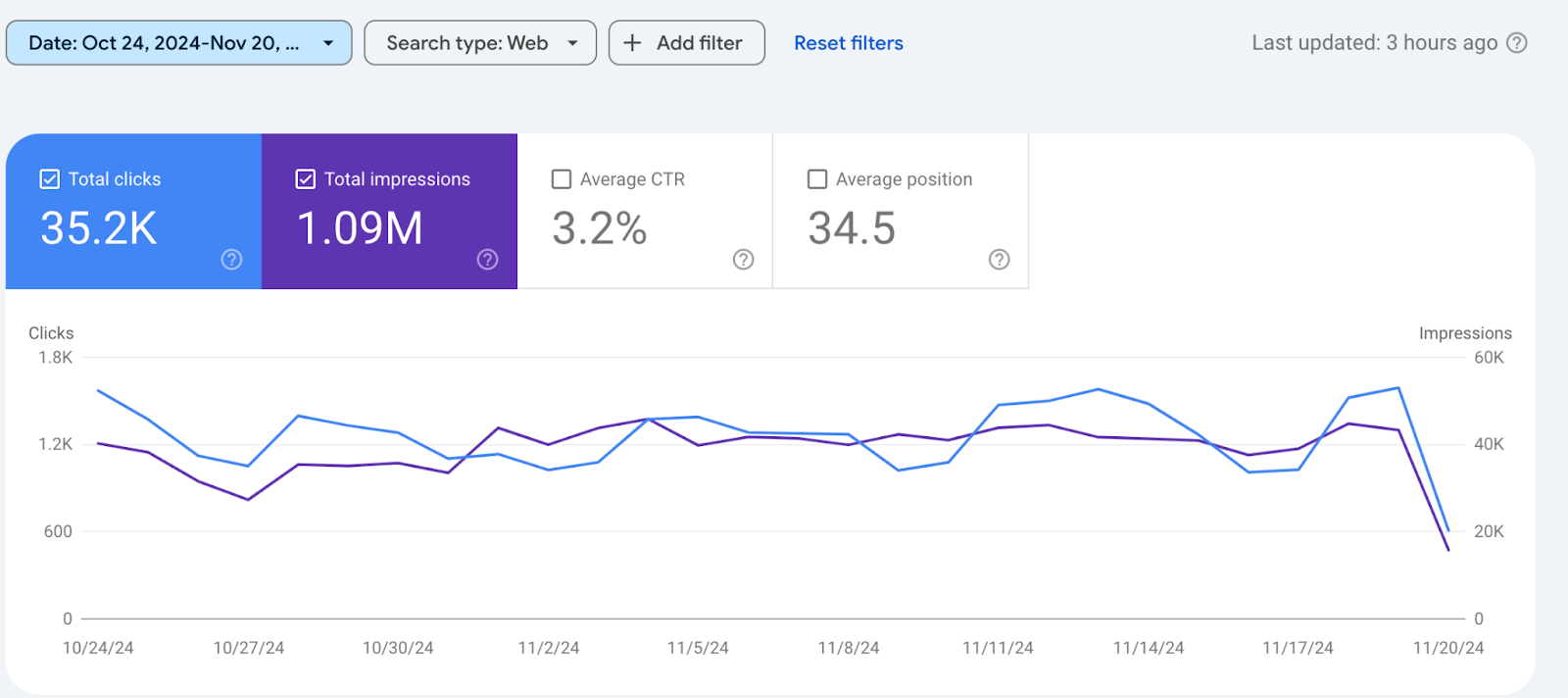
The default view of the GSC performance report for search results displays total clicks, impressions, CTR, and average organic position.
Source: GSC
However, discrepancies between GA4 organic click (~12K) events and GSC clicks (~35K) can still be observed.
Why the Discrepancy Persists?
Several factors explain the gap between GA4 and GSC data:
Click recording methods → GA4 counts after the tag fires, GSC counts at the SERP level.
Session handling → GA4 groups interactions into sessions, GSC does not.
Tracking methods → GA4 relies on cookies/JavaScript; GSC pulls directly from Google search logs.
Cross-device activity → the same person may appear as multiple “new users” in GA4.
Bot filtering → GA4 and GSC apply different filters.
Data sampling → GA4 may sample large datasets, whereas GSC is generally not sampled.
Understanding these differences saves you from chasing “missing traffic” and helps you present reports with confidence.
Use GSC for granular search performance: impressions, clicks, rankings.
Use GA4 for post-click engagement: sessions, conversions, and user flows.
Bring both together to map the journey, how discovery in search translates into valuable actions on-site.
In 2025, with Google’s AI Overviews and LLM-powered search results, this alignment is even more critical. Structured comparisons help you answer AI-driven queries (such as “GA4 vs GSC differences”) while also preparing you for SERP features, where concise and accurate data wins visibility.
Conclusion: Should GSC or GA4 Be Your Source of Truth?
The answer isn’t one or the other, it’s both. GSC is your authority for search visibility and performance, while GA4 tells the story of what happens after visitors land. Together, they provide the whole SEO picture: who is discovering you, how they engage, and whether they convert.
If you rely on just one, you risk reporting blind spots. But when you align GA4 and GSC insights, you can confidently show the impact of your SEO efforts from impression to conversion.
Want to Make Sense of your GA4 and GSC Data and Boost your SEO Performance?
upGrowth helps businesses integrate analytics insights, optimise SEO reporting, and turn data into actionable strategies.
Connect with upGrowth today to enhance your search visibility and gain insight into how your users interact with your site.
Watch: GA4 New Users vs Google Search Console Clicks Explained
FAQs: GA4 vs GSC
1. How do I link Google Search Console with GA4?
You can link GSC with GA4 to get a complete view of search performance and user behavior. This integration allows you to see which search queries drive traffic, track clicks, and analyze user engagement on your site.
2. What are the steps to integrate GSC data into Google Analytics?
First, verify your website in GSC. Then, in GA4, navigate to Admin → Product Links → Search Console. Follow the prompts to link your property and select the views you want to connect. Once linked, GA4 can display organic search metrics alongside on-site engagement.
3. What are the benefits of connecting GA4 and GSC?
Integrating GA4 and GSC helps you understand both search visibility and user behavior, optimize content for better rankings, track organic traffic more accurately, and identify opportunities for improving engagement and conversions.
4. How do GA4 new users differ from GSC clicks?
GA4 New Users measures unique first-time visitors to your site, while GSC Clicks tracks how many times your link was clicked from Google Search results. The metrics may differ because GA4 includes all channels and user sessions, whereas GSC focuses only on search traffic.
5. How can I use GA4 and GSC together to improve SEO reporting?
By aligning organic traffic in GA4 with GSC clicks and impressions, you can analyze which keywords bring valuable traffic, identify high-performing pages, monitor CTR versus bounce rate, and make data-driven content optimization decisions.
For Curious Minds
The core reason for the discrepancy is that GA4 and GSC are designed to measure completely different stages of the user journey. GA4 is an on-site analytics tool tracking user behavior across all channels, while GSC is a pre-click tool focused exclusively on your site's performance in Google's organic search results. This architectural separation means they will never align perfectly.
Your GA4 data is collected via a website tag that fires once a user lands on your page, capturing detailed interactions like sessions and pageviews. It identifies users with cookies or user IDs, which can be affected by browser settings or device switching. In contrast, GSC data comes directly from Google’s search logs, counting every valid click on your link from the SERP. Because GSC measures the click and GA4 measures the subsequent visit, factors like page load failures, tracking blockers, or data sampling in GA4 create a natural gap. Understanding this distinction is the first step to using both tools effectively for analysis.
These two metrics measure fundamentally different concepts, making direct comparison misleading. A GSC Click represents a single instance of a user clicking your website's link from a Google search results page. In contrast, a GA4 New User is a unique individual visiting your site for the first time during a specified period, identified by a cookie or user ID.
The key difference lies in what they track: GSC tracks an action (a click), while GA4 tracks a person (a first-time user). A single person could generate multiple Clicks in GSC over a week, but if they are using the same device and browser, GA4 will only count them as one New User during their initial visit. Conversely, if a user clears their cookies or uses a different device, GA4 may count them as a new user again on a subsequent visit. Grasping this helps you evaluate top-of-funnel reach versus actual site acquisition, preventing flawed conclusions about campaign effectiveness.
Choosing between GSC's CTR and GA4's bounce rate depends on what stage of the funnel you are analyzing. GSC's CTR is the ideal metric for evaluating pre-click performance, as it tells you how compelling your page titles and meta descriptions are in the SERPs. A high CTR suggests your snippet successfully attracted user interest.
However, GA4's bounce rate (or its inverse, engagement rate) is superior for evaluating post-click performance and traffic quality. This metric reveals what happens after the click, showing whether the landing page met the user's expectations. A high CTR paired with a high bounce rate often signals a disconnect between your search snippet's promise and the on-page content. For a holistic view, use both metrics sequentially: GSC's CTR measures your ability to win the click, while GA4's metrics measure your ability to retain and engage the visitor. This combined insight is far more powerful than relying on one alone.
Top agencies build a narrative by connecting pre-click potential with post-click behavior instead of trying to make the numbers match. They create reports that demonstrate how search visibility, measured by GSC impressions, converts into site visitors and then into business results tracked in GA4. This showcases a complete funnel, proving SEO's value beyond simple traffic metrics.
This approach involves a few key alignments:
Discovery to Acquisition: Correlate a rise in GSC impressions for target keywords with an increase in GA4 organic new users to show improved brand reach.
Intent to Engagement: Match high CTR in GSC for specific pages with low bounce rates or high average engagement times in GA4 to prove the content is meeting user intent.
Traffic to Conversion: Isolate the organic traffic segment in GA4 and track its journey to key conversion events, such as form submissions or e-commerce transactions.
This method of strategic data alignment provides a much more compelling story of SEO's impact on business goals.
A company can use these two metrics to diagnose its top-of-funnel performance and find growth opportunities. Imagine a blog post is generating a high number of Impressions in GSC (e.g., 50,000 per month) but a disproportionately low number of New Users from organic search in GA4. This discrepancy suggests the content is visible in search results but is failing to attract clicks.
The strategy here is to optimize for click-through rate without changing the core content that earned the high ranking. A data-driven marketer would analyze the SERP for that query, then A/B test different page titles and meta descriptions to make the snippet more compelling. For instance, they might add a number, a question, or a stronger benefit statement to the title. By monitoring the corresponding CTR in GSC after the change, the company can directly measure the impact of its optimization efforts on turning visibility into actual site traffic. This simple data-driven loop is a powerful way to capitalize on existing search equity.
To create a report that proves content marketing ROI, you must connect top-of-funnel search visibility to bottom-funnel actions. This requires a methodical approach to data integration rather than a simple side-by-side comparison. Following a clear process ensures you can accurately attribute conversions to specific search queries.
Here is a four-step plan to achieve this:
Filter GA4 for Organic Traffic: In your GA4 reports, use the 'Add comparison' feature to create a view that shows data exclusively from the 'Organic Search' default channel group.
Identify High-Value Pages: In GSC, identify the pages and queries that drive the most clicks and have the highest CTR. These are your top-performing assets in search.
Analyze On-Page Behavior: In your filtered GA4 report, navigate to the 'Landing Page' report. Analyze the engagement rates and conversion events for the high-value pages you identified in GSC.
Connect Queries to Conversions: Although direct query-to-conversion tracking is limited, you can infer performance by aligning the topics of high-converting pages in GA4 with the queries driving traffic to them in GSC.
This process helps you build a strong case for how specific content themes attract valuable users who convert, demonstrating clear ROI.
The most prevalent mistake is directly comparing GA4 New Users with GSC Clicks and expecting them to match. This apples-to-oranges comparison inevitably leads to confusion and flawed conclusions because the metrics are fundamentally different. It distorts performance analysis by creating an expectation of a 1:1 relationship that can never exist, often causing teams to question their data's integrity.
This error stems from a misunderstanding of what each platform measures. GSC tracks every click from a search result, while GA4 tracks unique visitors based on browser cookies, which can be blocked, cleared, or duplicated across devices. The correct approach is to use a more comparable set of metrics for alignment. For instance, comparing GSC Clicks to GA4 organic sessions provides a much more logical and insightful view. A session represents a visit initiated by a click, making it a closer proxy. By avoiding this common pitfall, you can shift the conversation from 'Why don't the numbers match?' to 'What does the user journey from click to conversion look like?'
Blending GSC Clicks with GA4 organic sessions creates a powerful diagnostic ratio that reveals the stickiness of your organic traffic. A significant drop-off between clicks and sessions, for instance, where sessions are much lower than clicks, points to critical technical or user experience issues. This gap indicates that users who clicked your link in the SERP never fully initiated a session on your site.
This could be due to several problems:
Slow landing page load times causing users to abandon the site before the GA4 tag can fire.
An incorrectly implemented or non-functional GA4 tracking code.
Aggressive bot traffic that GSC registers as clicks but GA4 filters out.
By calculating the ratio of sessions to clicks (e.g., Sessions / Clicks), you create a 'Click-to-Session Rate'. Monitoring this percentage over time helps you quickly identify technical SEO problems or poor landing page performance that could be costing you valuable traffic. This moves beyond simple volume metrics to provide a nuanced view of acquisition efficiency.
To stay relevant in 2025, SEO reporting must evolve from channel-specific vanity metrics to a holistic narrative that demonstrates user-centric value. This means going beyond rankings and clicks to show how search performance directly influences on-site engagement and business goals. The key is to systematically link GSC's pre-click data with GA4's post-click behavioral insights.
Your future-ready reports should connect these dots explicitly. For example, correlate a high CTR in GSC for a specific query with a high engagement rate and multiple pageviews per session in GA4. This proves your search snippet not only attracted a click but also delivered on its promise, satisfying user intent. Similarly, you can map increases in impressions for informational keywords in GSC to higher goal completions for newsletter sign-ups in GA4. This strategic alignment tells a far more compelling story about how SEO contributes to the entire customer journey, securing its place as a critical business driver.
Data sampling in GA4 can create significant discrepancies when comparing its metrics to the unsampled, census-level data from GSC. When a GA4 report is based on sampled data, it extrapolates trends from a subset of user interactions, which can introduce inaccuracies, especially for granular segments. This means the organic sessions or new users you see in a sampled GA4 report might not reflect the true volume, making a direct comparison with GSC's raw Clicks even more challenging.
To mitigate this, analysts have a few options. First, shorten the date range in GA4, as smaller ranges are less likely to trigger sampling. Second, use standard reports over custom explorations where possible, as standard reports are less frequently sampled. For businesses with GA4 360, accessing unsampled reports is the most direct solution. Acknowledge the potential for sampling when presenting data, framing the comparison as directional rather than absolute. This ensures stakeholders understand the inherent limitations and focus on the strategic insights rather than minor numerical differences.
This combination of data creates a powerful feedback loop for content strategy. By cross-referencing insights from both platforms, a content creator can move from guessing what works to making data-informed editorial decisions. GSC reveals the audience's intent before they arrive, while GA4 shows what they do once they are on the site.
The process works like this: first, identify landing pages in GSC that rank for a wide range of queries or have high impressions but a low CTR. This signals strong topical authority with an opportunity for better user targeting. Next, analyze these same landing pages in GA4 to see their engagement rate and if users proceed to other pages. This analysis uncovers what content satisfies user intent versus what causes them to leave. A page with high engagement suggests the topic resonates deeply, indicating an opportunity to create more cluster content around it. A page with low engagement might need to be rewritten or better aligned with the queries it ranks for. This refined process ensures the editorial calendar focuses on proven, high-impact topics.
The migration from Universal Analytics to GA4 requires a fundamental shift in how you compare search data, moving from a session-based to a user-and-event-based mindset. In Universal Analytics, comparing GSC Clicks to UA Sessions was a common practice. With GA4, while comparing Clicks to Sessions is still a valid starting point, the event-based model offers far richer insights.
You should now focus on mapping GSC performance to specific, valuable user interactions (events) in GA4. Instead of just looking at bounce rate, you can now measure engagement rate, which is based on a more meaningful set of criteria. The new model allows you to answer more sophisticated questions. For example, you can analyze which landing pages, found via specific queries in GSC, lead to the highest number of 'add_to_cart' or 'form_start' events in GA4. This shift requires you to think less about pageviews and more about the user journey, aligning your SEO efforts directly with the specific actions that drive business value.
Amol has helped catalyse business growth with his strategic & data-driven methodologies. With a decade of experience in the field of marketing, he has donned multiple hats, from channel optimization, data analytics and creative brand positioning to growth engineering and sales.

 Growth Strategy and Planning
 Inbound Growth
 Growth Hacking
 Fractional CMO
 Search Engine Optimization
 Paid and Performance Marketing
 Social Media Marketing
 Demand Generation
 AI-Driven Growth Strategy
 AI-Native Workflow Automation
 Generative Engine Optimization
 Grove — AI Growth Strategist

 AI Automation
 Framework
 Case Study
 Tools
Tools Growth Tools
 Decision Tree
 Compare
 Custom GPT's
 Guides
 Offer
Offer Webstories
 Quizzes
 Blog
Blog AI-powered Apps
 Social Media Tools
 Agency Fit Score